
Vocal Rider
Manual · version 0.2
Levels a vocal before the chain. It rides a gain towards a target, within a range, at a rise and a fall speed, and holds it while the vocal is absent. The target can be absolute or a set distance above whatever is on the side chain. Zero latency.
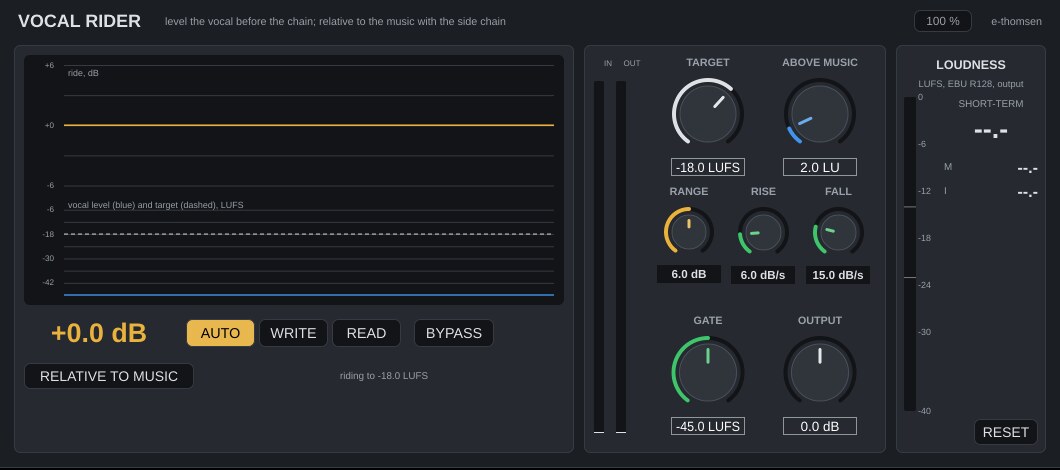
Where it goes
On the vocal track, in front of Vocal Chain. For a relative target, set the plugin's side chain to the kick or to the instrumental bus and press RELATIVE TO MUSIC.
Controls
| Control | What it does |
|---|---|
| Target | -40 to -6 LUFS, default -18. The level the vocal is ridden to when not relative. |
| Relative to music, Above music | With the side chain connected and signal present, the target becomes the side-chain level plus this offset (0 to 20 LU, default 2). Keyed to the kick, 1 to 2 LU is the usual distance. Keyed to the whole instrumental, set it by ear. When the side chain is quiet the absolute target is used, and the status line says which. |
| Range | 0 to 12 dB, default 6. The gain never travels further than this up or down. |
| Rise, Fall | Upward speed 1 to 30 dB per second (default 6), downward speed 1 to 60 dB per second (default 15). Fast fall and slow rise is the usual setting. |
| Gate | -70 to -20 LUFS, default -45. Below this level the vocal counts as absent and the gain holds. The gain also holds whenever the level falls away from its recent average, at the end of a word or a breath, so gaps are not pulled up. |
| Output | ±12 dB. |
| AUTO / WRITE / READ | AUTO rides. WRITE rides and publishes the gain to the Ride parameter thirty times a second, so with the track's automation in Latch or Touch, Logic records the ride into a lane. READ follows the Ride lane instead of riding, so a recorded ride can be edited by hand and played back. |
| BYPASS | The gain returns to 0 dB. |
The display
The last twelve seconds. The ride in dB on top, the vocal level and the target in LUFS below. The large number is the current ride.
Working with it
- Set the side chain and press RELATIVE TO MUSIC, or set an absolute Target.
- Play the song in AUTO and watch the trace. Adjust Range and the speeds until it moves the way a hand on the fader would.
- Set the track's automation mode to Latch, press WRITE, play the song through. The Ride lane is recorded.
- Switch to READ, fix the places it got wrong in the lane, and leave it there.
Under the hood
The vocal and the side chain are measured with K-weighted detectors with 250 and 400 ms windows, in the same units as the loudness meter. A 20 ms detector decides whether the vocal is present. The gain moves at the set speeds, is clamped to the range, and is smoothed before it is applied, so nothing clicks even when a lane is edited with steps.
Since 0.2 a mono vocal is measured as one channel, so it is ridden to the same level as the same vocal in stereo.
Loudness meter, level-matched bypass and mono handling work the same in every plugin. Common to all plugins