
Pump
Manual · version 0.2
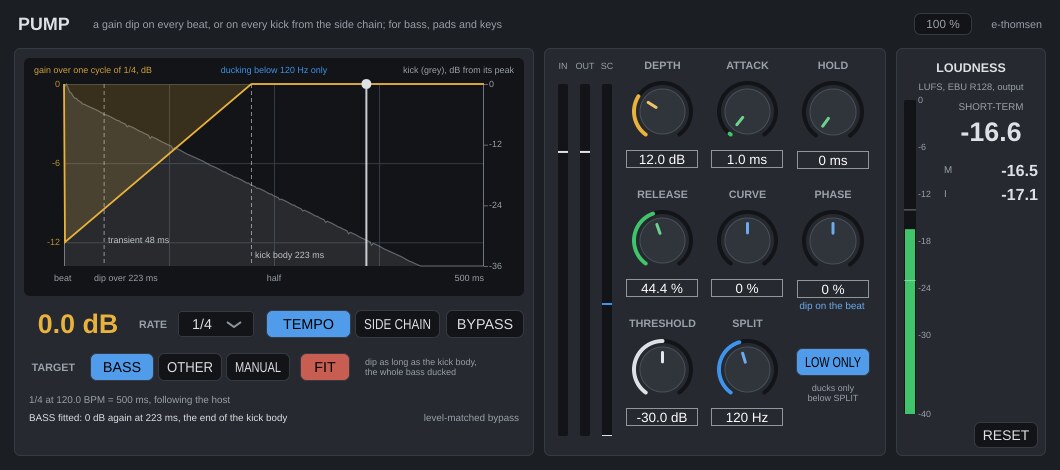
Ducking without a side chain. A gain dip on every beat, synced to the song tempo, for bass, pads and keys. When the real kick should drive it, switch to SIDE CHAIN and feed it the kick, and every hit restarts the dip. Zero latency.
Where it goes
On the bass, a pad or keys. Route the kick to the side chain even in Tempo mode. The kick then shows in the display and the dip can be fitted to it.
Controls
| Control | What it does |
|---|---|
| Rate | 1/16, 1/8 T, 1/8, 1/8 D, 1/4 T, 1/4, 1/4 D, 1/2, 1 bar or 2 bars, default 1/4. The length of one cycle. Bars follow the song's time signature. In side chain mode the rate still sets what Release is a percentage of. |
| Depth | 0 to 40 dB, default 12. How far the gain drops. Smoothed over 20 ms, so automation does not step. |
| Attack | 0.5 to 50 ms, default 2. From 0 dB down to the depth. |
| Hold | 0 to 300 ms, default 20. Time at the depth before the release starts. |
| Release | 2 to 100 %, default 60. The time back to 0 dB as a share of the cycle, so the shape holds when tempo or rate changes. 60 % of a 1/4 at 120 BPM is 300 ms. Never shorter than 5 ms, so even 40 dB does not click. |
| Curve | -100 to +100, default 0. The release shape. 0 is a straight line in dB. Negative comes up fast first and eases in. Positive stays down and comes up late. |
| Phase | -50 to +50 %, default 0. Moves the dip within the cycle, positive later. +25 % on a 1/4 puts the dip a 16th after the beat, and +50 % pumps on the offbeats. The line under the knob translates the setting at the current rate. Not used in side chain mode. |
| TEMPO / SIDE CHAIN | What starts a dip, default Tempo. Tempo follows the beat grid. Side chain reacts to a hit on the side-chain input. |
| Threshold | -60 to 0 dB, default -30. Side chain mode only. A hit is the side chain rising through this level, or jumping 6 dB within 10 ms while above it (the next kick in the tail of the last). The SC meter shows the side-chain level with the threshold as a blue mark. |
| TARGET and FIT | BASS, OTHER or MANUAL, default MANUAL. Fits the dip to the kick measured on the side chain. BASS returns the gain to 0 dB where the kick body ends and leaves Depth as it is. OTHER sets a 4 dB dip that is back at 0 dB where the kick transient ends. Choosing BASS or OTHER fits at once. FIT repeats it after a change of rate, tempo or kick. The knobs move as if turned by hand and can be adjusted afterwards. MANUAL changes nothing. |
| LOW ONLY and Split | Off by default. Split 60 to 300 Hz, default 150. With LOW ONLY on, the dip applies only below the split and the signal above passes untouched. The two bands sum flat when nothing is ducked. |
| BYPASS | Level-matched. |
The display
One cycle of the gain envelope in dB with the beat grid, a playhead, and the current gain as the large number. In side chain mode the display runs from the last hit.
Behind the gain curve, in grey, is the kick from the side chain. It is its peak envelope over the same cycle, averaged over the last 8 cycles (Tempo) or 8 hits (side chain), in dB from its own peak on the right-hand scale. Two dashed lines mark where it has fallen 6 dB (the transient) and 20 dB (the kick body), with their lengths. The window warns when the kick starts more than 10 % of the cycle away from the dip. With nothing on the side chain the display says so and draws only the gain.
Working with it
- Insert it on the bass or the pad, route the kick to the side chain and play a few bars.
- On the bass, choose BASS, so the dip lasts as long as the kick body. On pads, keys and everything else, choose OTHER, a light dip that only clears the transient.
- If the kick sits off the beat, set Phase so the dip lines up with the grey kick, then press FIT.
- If only the low end of the bass should move, turn LOW ONLY on and set Split.
- If the kick pattern has rests or is off the grid, switch to SIDE CHAIN and set Threshold so the SC meter crosses the blue mark on every kick and nothing else.
Without a side chain, set Depth until the kick comes through, then Release to taste. Shorter is a tighter bounce, longer a deeper wave. With the transport stopped the dips keep running at the last tempo, so the shape can be auditioned without playing.
Under the hood
In Tempo mode the envelope is computed per sample from song position and tempo, so it does not drift and lands within a sample of the beat. When the transport stops, a free-running clock continues at the last tempo. In side chain mode a hit that lands during a release starts the new attack from the gain at that moment. Anything that would make the envelope jump, such as a relocate or a rate or phase change, is bridged with a 5 ms fade. FIT turns the measured end of the kick into a release, the end minus attack and hold, as a share of the cycle.
Limits. Bar rates assume bars start at the beginning of the song, which holds for any session in one time signature. The kick envelope is full band, so a loud hi-hat on the same side chain counts too. A kick body longer than the cycle is marked at the end of the display, and BASS then releases at 100 %.
Loudness meter, level-matched bypass and mono handling work the same in every plugin. Common to all plugins