
Loud
Manual · version 0.3
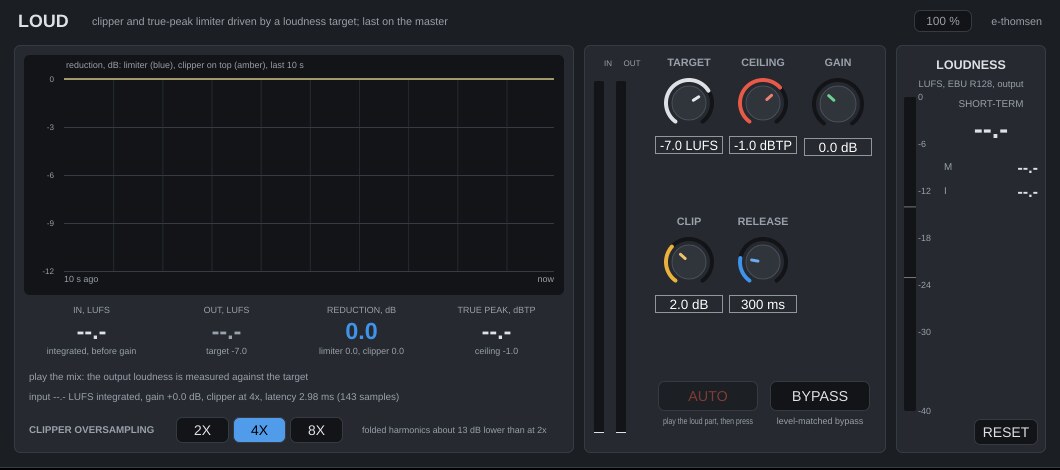
The last plugin on the master. Set the target loudness and the true-peak ceiling, press AUTO, and the mix lands there. The meters show what it cost.
Where it goes
Last on the master. An input gain brings the mix up, a soft clipper takes the tops of the transients, a true-peak lookahead limiter takes the rest, and a hard clip 0.1 dB over the ceiling guards the result. Latency is 143 samples (2.98 ms at 48 kHz) at every oversampling setting, reported to Logic and fixed, also during a bounce. Headroom Check on the mix bus shows beforehand how hard Loud will have to work.
Controls
| Control | What it does |
|---|---|
| Target | -14 to -4 LUFS, default -7. Where the output should land. Used only by AUTO and the output readout. |
| Ceiling | -3 to 0 dBTP, default -1. The output true peak never exceeds it. |
| Gain | -12 to +24 dB, default 0. Input gain before the clipper. AUTO writes it. |
| Clip | 0 to 6 dB, default 2. The clipper flattens everything above the ceiling plus this many dB, with a 3 dB knee. The limiter handles the band between. At 0 the clipper does almost all the work (dense, crunchy), at 6 the limiter does (cleaner, more pumping on sustained peaks). At 2 the clipper gets the drum tops and the limiter the rest. |
| Release | 100 to 1000 ms, default 300. The slow release. A fixed 50 ms release handles the transients. The slow one follows the programme and keeps the gain from pumping between hits. |
| Oversampling | 2x, 4x or 8x, default 4x. The rate the clipper runs at. Master at 4x. Try 8x when Clip is low, the material is bright and there is grit that is not in the mix. 2x costs the least CPU. Changes while playing crossfade over 20 ms. Bounces always render the clipper at 8x, and the line under the status says "render: 8x" while they do. |
| AUTO | A button, not a parameter. Sets Gain so the output lands on the target, and the label under it shows the value it will set. It works from the input loudness since the last RESET, so play the loudest part first. |
| BYPASS | Level-matched. |
| RESET | In the loudness panel. Restarts the loudness measurement, input and output, and with it the AUTO suggestion. |
The display
The trace shows limiter reduction (blue) with clipper reduction stacked on top (amber), in dB, over the last 10 seconds. Under it are input integrated loudness, output short-term loudness against the target (green within 1 LU, red above, amber below), current reduction, and output true peak held for 1.5 s, red if it ever passes the ceiling by more than 0.1 dB. The status line gives the distance to the target and how many LU the clipper and the limiter cost. The line under it gives input loudness, gain, oversampling and latency.
Working with it
- Set Target (-7 LUFS for pop and EDM, -9 to -8 LUFS for country and atmospheric music) and Ceiling (-1 dBTP for streaming).
- Play the chorus and press AUTO.
- Read the status line. If the clipper and the limiter cost more than 3 LU, the mix is asking too much. Go back to Headroom Check and the mix.
- Otherwise toggle BYPASS. The difference is only what the clipper and the limiter did.
- If the drums have lost their edge, lower Clip. If the bass pumps, raise Release. If it sounds dull and soft, raise Clip.
Under the hood
AUTO is more than target minus input loudness, because the clipper and the limiter cost loudness, a couple of LU at -7 LUFS. A second copy of the chain runs on the input at the gain AUTO would set, and the suggestion adds what that copy lost. It is within 0.5 dB after 6 seconds of playback and settles by 10. The copy runs only when needed, for 20 seconds after the plugin starts, after RESET or a change of settings, and while the window is open.
The clipper is oversampled because its harmonics would otherwise fold back into the audible band. On a 9 kHz sine pushed 9 dB into the clipper, the folded component at 3 kHz is 34.5 dB under the tone at 2x, 47.8 dB at 4x and 78.6 dB at 8x. The limiter's peak detector reads true peak between the samples, with a linear attack over the 1.5 ms lookahead and no overshoot. Stereo is linked. A lossy encoder after the master adds its own overshoot, hence the default ceiling of -1 dBTP.
Loudness meter, level-matched bypass and mono handling work the same in every plugin. Common to all plugins